
Kill repeated tool failures
The error types that cost the most time fail less, so the error rate and the error loops go down.
Signs you need it
Section titled “Signs you need it”This playbook applies when one of these shows. The thresholds are the app’s own.
| Where | Sign | The app shows it when |
|---|---|---|
| Activity, Needs attention | “N error loops: a tool failed 3+ times in a row.” The card is marked ● Act. | A tool failed 3 times or more in a row in one session. |
| Activity, Needs attention | “N tools fail over 10% of calls, worst …” | A tool with at least 20 calls failed more than 10% of them. |
| Activity, Work health | Errors per 100 calls reads “up from”, marked as worse | The rate rose against the previous period. |
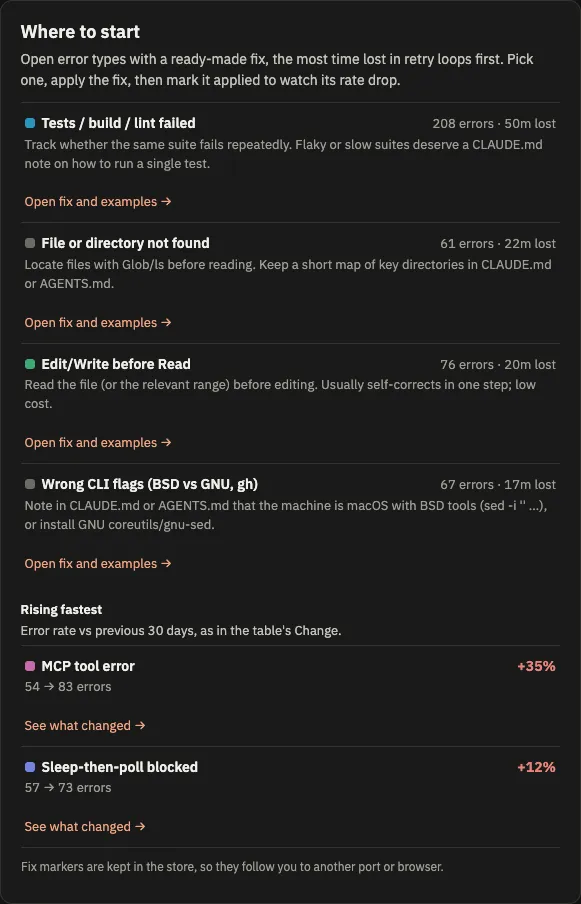
| Errors, Where to start | Open fixes lists a type | A type has a ready-made fix that you have not marked applied. |
| Errors, Where to start | Rising fastest lists a type | Its error rate rose by more than 10% of its earlier value, with at least 5 errors now. |
Failed test runs (“N failed test runs of M.”) also start here: their type is Tests / build / lint failed.
Diagnose
Section titled “Diagnose”Find out which of five causes you have. Errors counts automated sessions too; it has no Include automated sessions control.
- Open Errors with the range at 30d. Turn on Hide noise and muted, in the type table’s toolbar: harness errors, user rejections and muted types leave the view.
- In Where to start, select the first type under Open fixes: it lost the most time in retry loops. If Open fixes reads “Nothing open with a known fix.”, sort the Error types table by Time lost and open the top row.
- In the type detail, read the incident line, such as “40 errors in 12 incidents, 25% did not recover … Largest: 6 attempts over 4m” (an example). Then read By project and By agent: they tell you which project and which agent to fix.
- Read Potential fix. Note whether it has a line to paste with Copy instruction line, or names a shell or agent setting.
- If it has neither, switch the list to By message. The top message, with its share of the type’s errors, names the repeated cause.
- If you came from the error loops of Activity, select See loops on its Needs attention card. Note the tool and the number of failures of each loop.
| What you see | Cause | Fix |
|---|---|---|
| Potential fix has a line and Copy instruction line. | The agent lacks a rule that the app knows. | Paste the ready-made fix |
| Potential fix names your shell, permissions or sandbox. | A setting of the machine or the agent. | Change the setting |
| No line to paste, and one message leads By message. | A cause no ready-made fix covers. | Write your own rule |
| The type is harmless and expected, such as grep/rg found nothing (exit 1). | Noise that hides the real failures. | Mute the noise |
| Loops of many attempts, of any type, in which the agent repeats the same call. | The agent retries instead of changing its approach. | Stop blind retries |
Where to paste a rule:
| The type happens | Claude Code | Codex |
|---|---|---|
| In one project (By project) | CLAUDE.md at the project’s root |
AGENTS.md at the project’s root |
| In most projects | ~/.claude/CLAUDE.md |
~/.codex/AGENTS.md |
For Grok, paste the rule into the instruction file your Grok CLI reads; to keep one file for every agent, see Give every agent the same instructions. Several ready-made lines name Claude Code tools or options, such as Read, Grep or run_in_background: paste those into CLAUDE.md only, and leave them out of the files other agents read. See Supported agents.
By agent says which agent fails. If more than one does, paste into each agent’s file. A rule about your own machine, such as your shell or your aliases, goes in the file in your home directory, even for one project: the project’s file is often in git, and its rules reach everyone who uses the repository.
Paste the ready-made fix
Section titled “Paste the ready-made fix”- In the type detail, select Copy instruction line.
- Paste the line into the file from the table above. Fill any placeholder in angle brackets: for
<list them>, the CLIs the project uses, starting with the ones the examples show missing; for User rejected the action, which is only a placeholder, the preference that the examples show you kept repeating. - Set Applied on to today and select Mark fix applied. The marker applies to all projects, and Before and after the fix starts to count.
The ready-made lines, as the app shows them:
| Type | Line to paste |
|---|---|
| Path outside isolated worktree | When working in a git worktree, only use paths inside that worktree. Never cd to or edit the main checkout. |
| Command too complex for worktree check | In a worktree, run one simple command per call with literal arguments: no heredocs, $(…), variables or chained commands. |
| Sleep-then-poll blocked | Never sleep-poll. Use run_in_background and wait for the completion notice. |
| ls aliased to eza | ls is aliased to eza; use command ls in shell commands. |
| Wrong CLI flags (BSD vs GNU, gh) | macOS: BSD sed/date/stat. Use sed -i ‘’ and check gh <cmd> --help for flag combos. |
| zsh glob had no matches | The shell is zsh: quote glob patterns (e.g. find . -name ‘*.ts’); unmatched globs abort the command. |
| Command not found | Available CLIs: <list them>. Use python3 (not python). Check command -v X before using an unfamiliar tool. |
| File or directory not found | Do not guess file paths: list or glob first. Key dirs: <src/…, tests/…>. |
| Edit/Write before Read | Always Read a file before Edit/Write on it. |
| Edit old_string mismatch | For Edit, copy old_string verbatim from a recent Read, with enough context to be unique. |
| User rejected the action | <Your preference that the agent kept missing> |
| Network / DNS unreachable | The sandbox has no network access. Ask before running commands that download or call remote services. |
| Browser automation failed | Browser automation: snapshot before acting, use fresh element refs, and wait for an element instead of a fixed delay. |
| Command timed out | Run dev servers and long test suites with run_in_background. |
| grep/rg found nothing (exit 1) | grep/rg exit 1 means no matches; use the Grep tool or append || true. |
| Chained command: one step failed | End optional probes in chained commands with || true so the call does not report failure. |
| Tests / build / lint failed | Run a single test with: <command>. Full suite: <command>. |
| git / gh error | Run git status before git operations that change branches or history. |
Each line starts with - in the copied text, so it pastes as a list item. Some lines name Claude Code tools, such as Read, Grep or run_in_background: leave those lines out of AGENTS.md.
Change the setting
Section titled “Change the setting”Some fixes are a setting, not a rule. Potential fix names it:
-
ls aliased to eza: make the alias interactive-only in
~/.zshrc:Terminal window [[ -o interactive ]] && alias ls='eza --icons' -
zsh glob had no matches: add
setopt nonomatchto~/.zshenv, or paste the ready-made line. -
Wrong CLI flags (BSD vs GNU, gh): paste the ready-made line, or install GNU coreutils and GNU sed.
-
Permission / safety check denied: for a safe command that the agent runs often, allow it in the project’s
.claude/settings.json, such as:{"permissions": {"allow": ["Bash(npm run test:*)"]}} -
Network / DNS unreachable in Codex: allow network access for the sessions that need it, in
~/.codex/config.toml:[sandbox_workspace_write]network_access = true
Then select Mark fix applied, as in Paste the ready-made fix.
Write your own rule
Section titled “Write your own rule”For Other, Other non-zero exit, MCP tool error, Script error (Python/Node) and the other types without a line to paste:
-
In By message, open the top message and read two or three examples: the input, the error and the tool’s result.
-
Write one line that tells the agent what to do instead, and paste it into the file from the table above. A template:
- <tool or command>: <what fails>. Instead, <what to do>.For example (an example):
- The test database is not running by default. Run make db-up before the integration tests. -
Select Mark fix applied.
For MCP tool error, read By tool: if one server leads, check that it is connected and authorized, or update it. Harness / connection failure cannot be fixed by a rule: update the agent or the server if it rises.
Mute the noise
Section titled “Mute the noise”For a type you expect and accept, such as grep/rg found nothing (exit 1) or Chained command: one step failed, select Mute this type in its detail. Both also have a ready-made line. Rule of thumb: paste it when Time lost, the time in retry loops, shows a time; mute the type when it shows “–”. A muted type needs no Mark fix applied. With Hide noise and muted on, it leaves the error rate, the chart, the type table and the comparison, so the real failures show. It never shows in Where to start. Harness / connection failure and User rejected the action are always noise and cannot be muted.
Stop blind retries
Section titled “Stop blind retries”Rule of thumb: an agent that fails the same way twice will not succeed the third time. Paste this into the file from the table above:
## When a tool call fails- If a command fails twice with the same error, stop. Read the error, change the approach, or ask me.- Do not rerun a failing test suite unchanged. Fix the cause, or run the single failing test.There is no type to mark for this rule. Verify it with the error loops of Activity.
Verify
Section titled “Verify”The same day: in the type detail, select Every error, newest first and Refresh in the navigation bar. No new error of the type should appear after the time you pasted the fix. A session that started before the change still runs on the old file: judge new sessions only.
After the fix has collected enough calls (the more calls a day, the sooner), open the type with the same project and source filters, and read Before and after the fix. It compares the error rate before the day you marked with the rate since, over all time. To check every fix at once, read Applied fixes under Where to start, with no type open: one row per fix, with the same verdict.
| Verdict | What to do |
|---|---|
| Rate lower | Done. Go to the next type in Open fixes. |
| Not enough calls yet | Wait. The line says how many calls since the fix are still needed: at least 200, and enough for the old rate to have produced 5 errors. |
| Rate unchanged or Rate higher | The rule did not hold. Read By message again: the remaining errors may have another cause. Check that the rule is in the file of the agent that fails (By agent). |
After 7 days, set the range to 7d and read:
| Figure | Where | Expected |
|---|---|---|
| “N error loops” | Activity, Needs attention | A smaller N, or no such line. |
| Errors per 100 calls | Activity, Work health | Reads “down from”. |
| Change | Errors, the summary | Below 0%. It shows “–” when either week has fewer than 200 tool calls: then read it at 30d. |
| Fixes applied | Errors, the summary | One more fixed type, one less open fix. |
Related
Section titled “Related”- Errors: every panel, the type rules and the fix marker.
- Activity: Needs attention, Work health and the error loops.
- Metric glossary: incident, recovered, error rate and the other terms.
- Keep context lean: the other playbook that ends in a
CLAUDE.mdorAGENTS.mdchange. - Weekly 15-minute review: where Errors sits in a routine.